
Phone number formats
The masks that tell the clipboard which number-shaped runs are actually phone numbers: mask characters, length bounds, the matching leeway, and the built-in tester.
The clipboard’s entity chips pull one-time codes, links and phone numbers out of what you copy. A code has a shape and a link has a scheme, but a phone number is just digits, so with nothing to go on the detector keeps every run of 7 to 15 of them. That’s how an invoice total, an order reference or a column out of a spreadsheet ends up wearing a phone chip. This screen is where you tell it what your numbers look like, and it stops guessing.
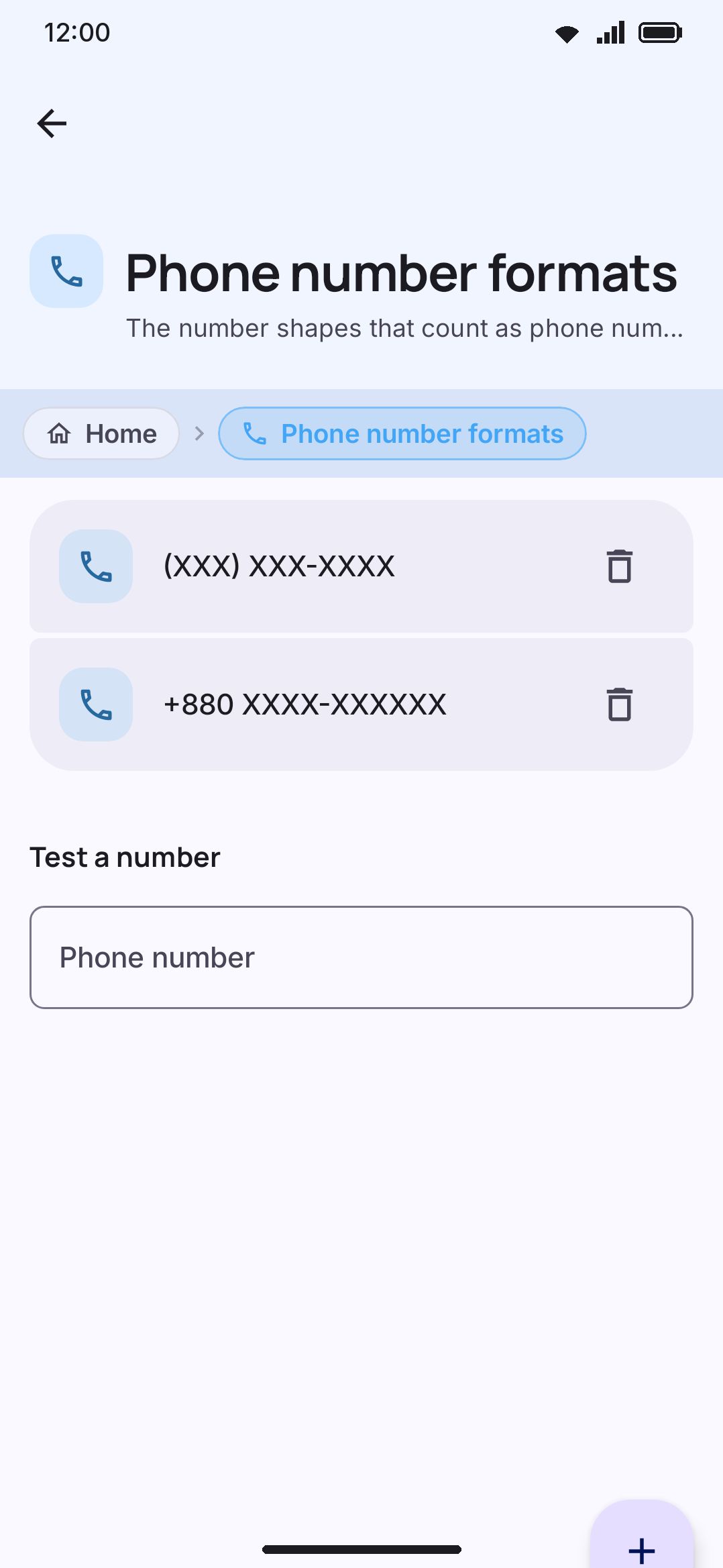
The list is not empty to begin with. It starts with one mask for your own country, read off your phone’s region the same way the calendar tool picks its alternate calendars: a phone in Bangladesh opens on +880 XXXX-XXXXXX, one in the US on +1 XXX-XXX-XXXX. The table covers about 110 regions, and it’s mobile numbers, so a country whose landlines run to a different length will drop those. Edit the mask, add a second one, or delete it and go back to catching every number. A region the table doesn’t know, and one it deliberately leaves out because its numbers have no single length (Germany and Austria), start with nothing.
The row that opens it sits on the Clipboard tool’s own settings and only appears while Detect codes, numbers and links is on, since there would be nothing to filter otherwise. Its subtitle counts your saved masks, or reads “Keep only the numbers that look like the ones you copy. Every number becomes a chip now” once you have deleted them all. Settings search indexes the screen either way, so searching “phone number formats” reaches it even with the toggle off.
Adding a format
Section titled “Adding a format”Add a format opens a one-field dialog that takes either of two things, and works out which you gave it:
- A number you copy often. It turns that into a mask for you: if you wrote a leading
+, the dial code stays as it is and every other digit becomes anX. Your spaces and hyphens are kept, so+880 1712-345678comes back as+880 XXXX-XXXXXX. - A mask you wrote yourself. Anything containing an
X, anxor a#is read this way.xand#are stored asXso two spellings of one mask can’t both sit in the list.
The dialog previews the mask as you type (“Format: +880 XXXX-XXXXXX”), says “This is not a phone number yet” while the field holds something it can’t read, and keeps Add disabled until it can.
The mask it makes from an example is a starting point, not the finished thing. Type a digit back over one of the Xs to pin it: that’s how +880 XXXX-XXXXXX becomes +880 1XXX-XXXXXX, which says “dial code 880, then ten digits, and the first of those is a 1”.
What a mask means
Section titled “What a mask means”| Character | Meaning |
|---|---|
0–9 | A digit that has to match exactly at that position |
X | Any digit (x and # are accepted and stored as X) |
+ at the front | What follows is a dial code, so this mask names a country |
space - ( ) . [ ] / | Decoration. Ignored on both sides, so write the mask the way you write the number |
Anything else, a letter or a currency sign, means it isn’t a mask and won’t save.
Two bounds apply to the digits, wildcards included: at least 4, at most 15. Below four a mask stops naming a number and starts matching stray digits, and fifteen is the ceiling E.164 puts on a phone number anywhere in the world.
For a mask with a +, the dial code is whatever comes before the first separator you wrote: +880 1XXX-XXXXXX has a dial code of 880 because of the space. Write it without separators and the length is worked out instead, from the same three rules E.164 uses. One digit for the zones starting 1 or 7 (North America, Russia and Kazakhstan). Two digits for the 44 codes that get two: 20, 27, 30 to 34, 36, 39, 40, 41, 43 to 49, 51 to 58, 60 to 66, 81, 82, 84, 86, 90 to 95, and 98. Three for everywhere else.
A mask that is nothing but a dial code won’t save either: there’d be no number left to match.
Why +XX isn’t a country
Section titled “Why +XX isn’t a country”A dial code written as wildcards names no country, so a mask like +XX 1XXX-XXXXXX can’t hold you to one. Rather than reject it, the app keeps the part that still means something. It drops the wildcards where the code was, and what’s left becomes a national mask. That behaves exactly as though you’d written 1XXX-XXXXXX: a real filter for ten digits starting with a 1, from any country, and probably not the one you thought you were writing. The row still reads back the way you typed it, + and all, so the plus sign in it is doing nothing.
What counts as a match
Section titled “What counts as a match”The matching is forgiving about the things people vary and strict about the things they don’t.
Forgiving:
- Separators are ignored on both sides.
01712-345678,01712 345678and(01712) 345678are all the same number to a mask, whatever the mask itself was written with. - The country code is optional. A mask with a dial code also matches the number without it, and with a national trunk
0in the dial code’s place. One mask covers+8801712345678,8801712345678,01712345678and1712345678. - The trunk
0goes on whichever side lacks it, never both, so a mask of nine wildcards can’t quietly start accepting ten digits.
Strict:
- The length has to be exact. A mask is a template, and a run of digits either fills it or doesn’t.
- A pinned digit has to be there.
1XXX-XXXXXXturns down anything whose national part starts with a 2. - A clip that names a country has to match one. A leading
+or00is a statement about where the number is from, so it’s checked against the mask’s dial code. That’s what keeps a foreign number out. Against a national mask, the clip’s own dial code is stripped off first and only the rest is compared, since a national mask has nothing to say about countries.
Testing a number
Section titled “Testing a number”Test a number at the bottom takes a number and tells you the answer straight away, before you find out the hard way with a clip you needed:
- “The keyboard makes a chip for this number.”
- “The keyboard skips this number. It matches no format.” (shown in the error colour)
- “There is no format, so the keyboard makes a chip for this number.” while your list is empty.
Nothing you type here is saved or matched against anything but your own masks.
What the formats change
Section titled “What the formats change”With no formats saved, the detector falls back to shape alone: 7 to 15 digits, and no more than 11 of them if the run has no punctuation and no +. Save even one format and those stand-ins step aside, because you’ve told it something better: the floor drops to 4 digits and your masks decide the length.
Everything else stays exactly as it was. A mask can only take numbers away, never add one back, so a run still has to be found as a number first, and the guards around that don’t move: a bare year or date is never a phone number, and neither is a run of digits sitting right after #, $, £ or €.
Options
Section titled “Options”| Control | What it does | Default |
|---|---|---|
| Add a format | Opens the dialog described above | n/a |
| The saved list | One row per mask, sorted alphabetically, each with a delete icon. Empty, a caption reads “There is no format. The keyboard keeps every number.” | One mask for your phone’s region |
| Test a number | Text field, checks a number against your masks without saving it | Empty |
The list has no cap: add one per country you deal with. It’s a set rather than a list, so adding a mask you already have changes nothing.
Details & edge cases
Section titled “Details & edge cases”- Delete has no confirmation. The trash icon on a row removes that mask on the tap, with no prompt and no undo. Deleting your last one puts you back to catching every number.
- This screen is a filter, not a switch. Turning Detect codes, numbers and links off hides it and stops all the chips, formats or no formats.
- Masks are settings, so they travel. They’re stored with the rest of your preferences and ride along in a settings export, not in the clipboard section of a backup (that section carries clips).
- Written formats keep your separators, examples keep the example’s. The mask is stored as typed apart from the
x/#folding, so+880 1XXX-XXXXXXand+8801XXXXXXXXXboth sit in the list looking like what you gave it, and match identically. - The dial-code rules are rules, not a table of countries. They cover every dial code in three lines instead of two hundred rows, which is why a mask you wrote without separators is split where E.164 says rather than where a particular country’s list says.
- No edition differences. The screen and the matching behave the same on the full and lite builds.
Related pages
Section titled “Related pages”- Clipboard manager: the entity chips these masks filter, and every other clipboard setting.
- One-time codes: the other fragment the clipboard pulls out on its own, which needs no configuring.
- Tools: the master tool list this screen hangs off, two levels up.